
MDT 2203-E mini straight transducerized electric screwdriver
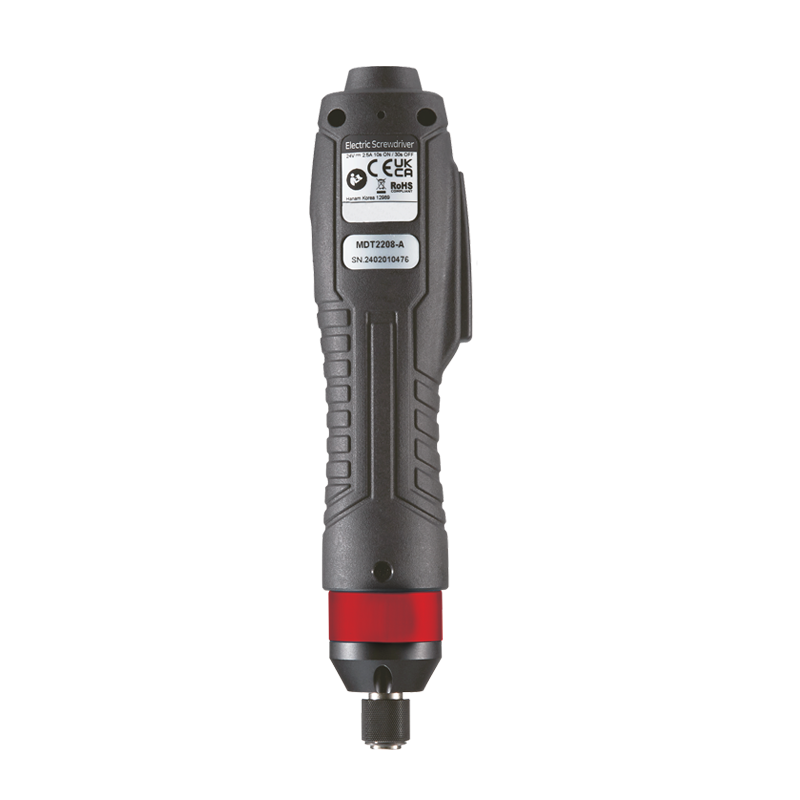
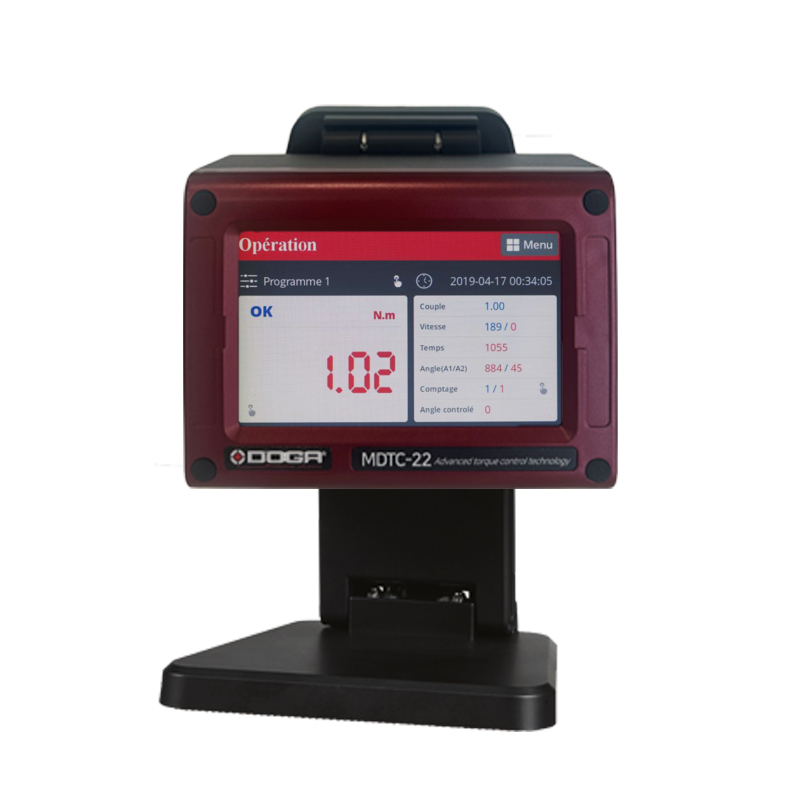
MDT 2203-E mini straight transducerized electric screwdriver
Technical details
Benefits
• Maintenance-free Maxon motor, made in Switzerland
• Lightweighted and well-balanced tool
• Ergonomic handle
• Quiet motor
• Traceability of tightening torques
• Real-time display of tightening curves
• Anti-error system
Product description
This dedicated controller is easy to adjust thanks to its automatic programming mode via its color touch screen or PC software, it allows you to optimize your operating speed.
Data are stored and transferable via Ethernet, Modbus or Open Protocol protocols.
Displayed menus are multilingual.
Associated products
MDTC controller
This controller is dedicated to MDT series transducerized torque and angle tools.
DOGANet software to collect and analyze assembly data
A complete and ready-to-use software that meets your assembly process traceability needs with your DOGA torque and angle controlled screwdrivers. Easy to install on a network-connected PC
ParaMon-Pro X controller
DPC Touch: sequencing and process monitoring interface
Air vacuum system & sleeves
By holding the screw under vacuum at the end of the screwdriver, this screw gripping system meets your non-magnetic or small screw assembly needs, especially when access to the screw point is restr
Resources
1Commercial documentation

Transducerized tools - MDT series - DOC.60408
- Main features
- Model specifications
- Technical details
- MDTC controller
- Controller communication and display
- Torque and angle tightening strategies
- Models and data communication
- Accessories and services provided
- Additional products
4Software

ParaMon software
The compressed file contains 2 generations of software and screwdriver firmware.
You should use the generation corresponding to the firmware currently installed on your screwdriver or controller in order to update it to the latest version without changing settings.
- ParaMon III for GEN1 screwdrivers with firmware versions v2.3.xx and v3.xx.xx
- ParaMon4 for GEN2 screwdrivers with firmware versions v4.xx.xx and v5.xx.xx
Upgrading from GEN1 to GEN2 is possible but will result in incompatibilities if your equipment communicates with an existing automation system, as well as a loss of settings (please contact us first).
Please note that BM(T) screwdrivers have two distinct firmware versions depending on the Wi-Fi module model installed. If the character ‘+’ appears after the text ‘network info’, the firmware to use is the one with a filename containing xxx_9116_xxx.bin.
Please refer to document 60205, which lists all firmware versions.
Files version:
• Readme
• 60205 ParaMon XML vs Firmware 07-2026
ParaMon III:
• BM_FW v1.34.6 + XML v1.10
• BM_FW_v1.54.6_RS9116+XML_v1.10
• BMT_FW v1.44.7 + XML v1.11
• BMT_FW_v1.54.7_RS9116+XML_v1.11
• MDC22_MINI_FW_v3.01.2+XML_v1.10
• MDC26&32_FW_v2.32.7+XML_v1.10
• MDTC38_Normal_FW_v1.34.5+XML_v1.13
• ParaMon_v3.00.9_20260402
• ParaMon III manuel d'utilisation - DOC.41014
• ParaMon III user manual - DOC.60505
ParaMon4:
• BM_FW_v4.0.12+XML_v4.2.1
• BM_FW_v4.3.12_RS9116+XML_v4.2.1
• BMT_FW_ v4.0.13+XML_v4.2.1
• BMT_FW_ v4.3.13_RS9116+XML_v4.2.1
• BMT40_FW_v4.0.14+XML_v4.2.1
• MDC_FW_v4.0.12+XML_v4.2.1
• MDC_MINI_FW v4.0.12+XML_v4.2.1
• MDTC_MINI_FW_v4.0.14+XML_v4.2.1
• MDTC38_FW_v4.0.14+XML_v4.2.1
• ParaMon_4.1.2_net8.0_20260508
• ParaMon-Pro X v4.2.2 20251216
• Mise à jour firmware vers Gen 2
• Update to Gen 2 firmware
Download the file in zip
2Technical documentation
COM Modbus MDC V2 / MDT protocol and registers lists - DOC.60430 - DOC.60454 - DOC.60455
- Com Protocole MODBUS MDv2 MDT – DOC.60430
- Modbus MDCv2 address and function – DOC.60454
- Modbus MDTC address and function – DOC.60455
COM OPEN Protocol MD(T) / BM(T) series user manual - DOC.60428
1- Controller firmware version
2- Communication type
3- Message structure
4- Communication flow
5- Communication messages
MDT series instructions manual - DOC.60429
- Safety rules
- Product
- Main features
- MDT screwdrivers
- MDT screwdriver cable
- Controller MDTC
- Operation
- Firmware update
- Torque calibration and compensation
- Error code
- Web server
- Register list summary
- Com protocols
- Maintenance
- Standards